Equipment Hire Software for Xero
Send hire invoices and payments to Xero, map your accounts and tax rates, and keep customer records aligned.
In short
HireLogic is equipment hire software with a live Xero integration. Finalised hire invoices move to Xero line by line with account and tax mappings, payments recorded in HireLogic are allocated to those invoices, and customer records can move both ways. It connects to one Xero organisation through secure OAuth and is included with HireLogic.
The setup guide below explains how to connect Xero, what information moves in each direction, and where the integration deliberately stops.
How to connect HireLogic and Xero
Connect one Xero organisation, map the accounting fields you already use, then monitor the first transfer in HireLogic.
- 1
Authorise your Xero organisation
Open the Xero setup wizard in HireLogic and sign in through Xero. The connection uses Xero OAuth, so HireLogic never receives or stores your Xero password. A Xero user with the Standard, Adviser or Administrator role and Connected Apps permission must authorise the connection. Each HireLogic account connects to one Xero organisation.
- 2
Map accounts and tax rates
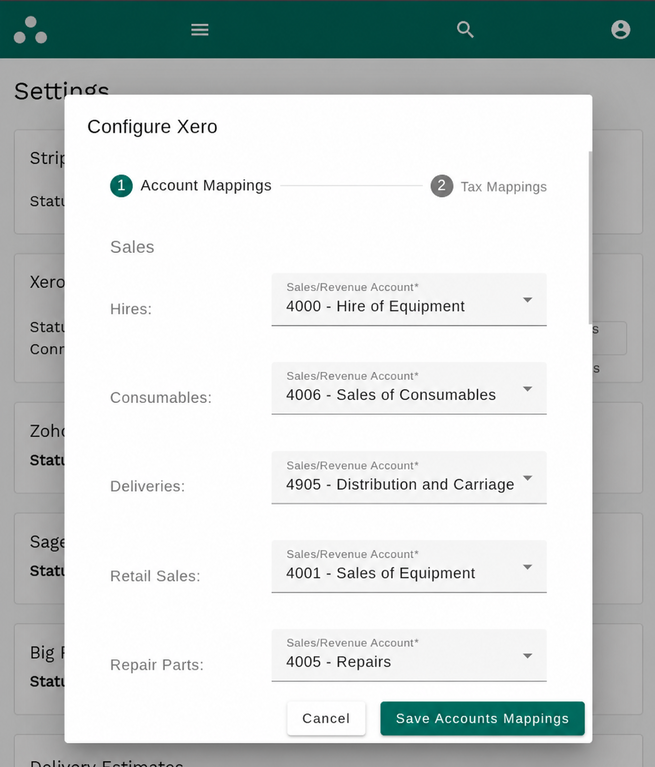
Continue through the self-serve wizard to match hire revenue, equipment and consumable sales, delivery, retail, repair work and payment methods to the accounts you already use in Xero. Then match each HireLogic tax rate to an active Xero tax rate. The complete setup typically takes 5–10 minutes.
- 3
Bring contacts and retail products together
Import Xero contacts into HireLogic and match customer records before the first invoice transfer. Xero contact changes can flow back through the connection, while customer details are sent to Xero with invoices. Retail products can be imported from Xero and updated from HireLogic.
- 4
Raise the hire invoice in HireLogic
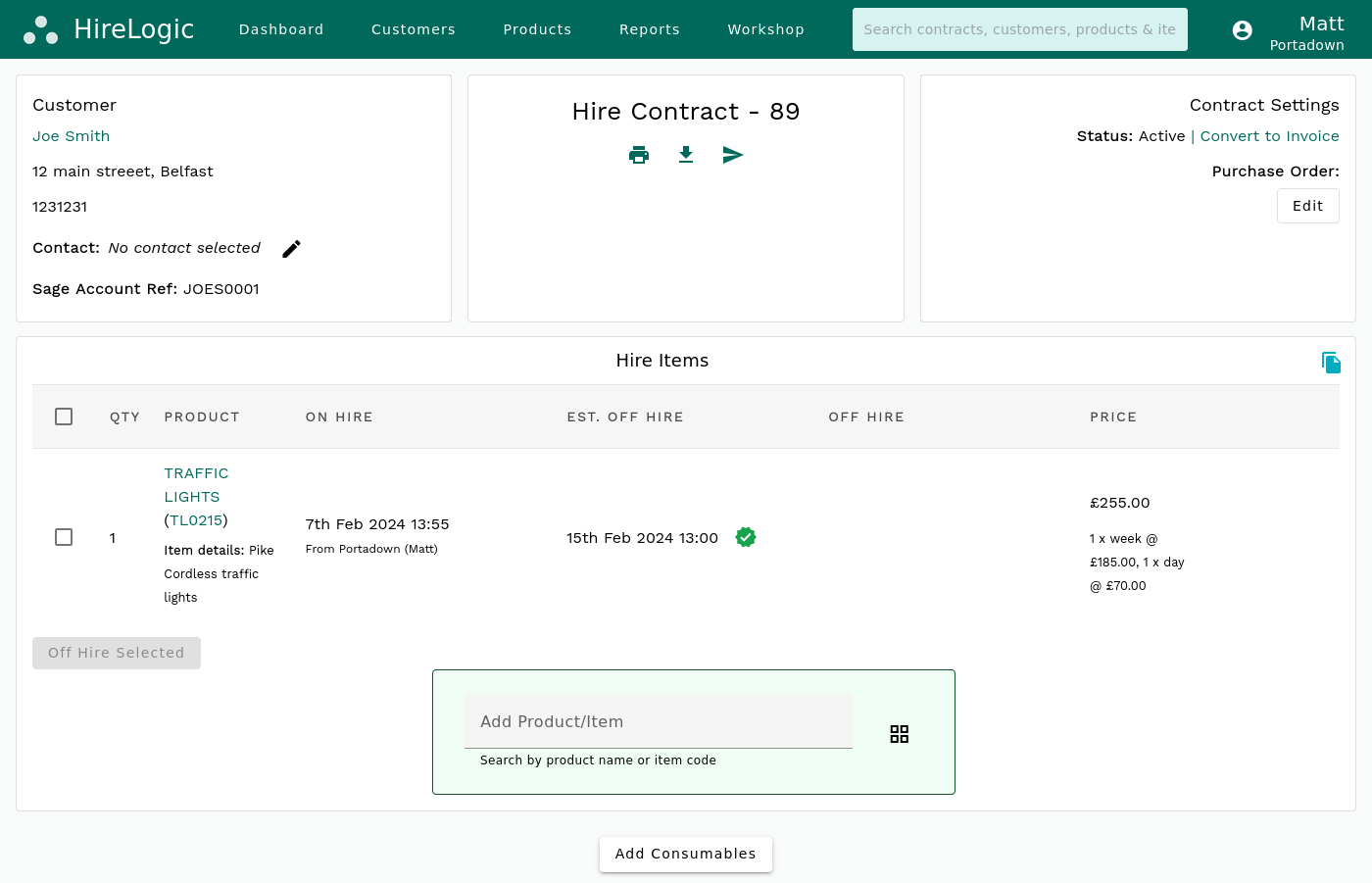
Once a hire invoice is finalised, HireLogic queues it for Xero with its invoice number, contract number, customer, purchase-order reference, currency and line-by-line charges. Hire equipment, consumables, delivery and discounts retain their mapped accounts and tax rates. Xero invoices are authorised by default, and you can configure a different invoice status.
- 5
Check the first transfer and monitor results
Account transfers run every ten minutes. The HireLogic account-transfer report shows pending, successful and failed invoices, payments and retail products, including the Xero response when something needs attention. Configured contacts receive an email when a transfer fails. Xero and HireLogic errors are not retried automatically; correct the issue, then retry the transfer.
What syncs between HireLogic and Xero
The integration sends operational accounting records to Xero while keeping HireLogic as the source for hire activity.
In HireLogic
Customer name, address and contact details
In Xero
Contact
Direction
Two-way
When
On import, invoice transfer or Xero contact update
In HireLogic
Finalised or recurring hire invoice
In Xero
Sales invoice, authorised by default
Direction
HireLogic → Xero
When
On the next account transfer
In HireLogic
Hire, consumable and delivery charges
In Xero
Separate invoice lines with mapped accounts
Direction
HireLogic → Xero
When
With the invoice
In HireLogic
Invoice, contract and customer PO numbers
In Xero
Invoice number and references
Direction
HireLogic → Xero
When
With the invoice
In HireLogic
Payments and part-payments
In Xero
Payment allocated to the invoice
Direction
HireLogic → Xero
When
After the invoice has transferred
In HireLogic
HireLogic tax rates
In Xero
Active Xero tax rates
Direction
Mapped at setup
When
Applied to each invoice line
In HireLogic
Retail and EPOS sale
In Xero
Sales invoice with separate item lines
Direction
HireLogic → Xero
When
When the sale is finalised
In HireLogic
Retail product details
In Xero
Xero item
Direction
Two-way
When
On Xero import or HireLogic product update
In HireLogic
Invoice currency and exchange rate
In Xero
Currency code and rate
Direction
HireLogic → Xero
When
With each invoice
| In HireLogic | In Xero | Direction | When |
|---|---|---|---|
| Customer name, address and contact details | Contact | Two-way | On import, invoice transfer or Xero contact update |
| Finalised or recurring hire invoice | Sales invoice, authorised by default | HireLogic → Xero | On the next account transfer |
| Hire, consumable and delivery charges | Separate invoice lines with mapped accounts | HireLogic → Xero | With the invoice |
| Invoice, contract and customer PO numbers | Invoice number and references | HireLogic → Xero | With the invoice |
| Payments and part-payments | Payment allocated to the invoice | HireLogic → Xero | After the invoice has transferred |
| HireLogic tax rates | Active Xero tax rates | Mapped at setup | Applied to each invoice line |
| Retail and EPOS sale | Sales invoice with separate item lines | HireLogic → Xero | When the sale is finalised |
| Retail product details | Xero item | Two-way | On Xero import or HireLogic product update |
| Invoice currency and exchange rate | Currency code and rate | HireLogic → Xero | With each invoice |
One HireLogic account connects to one Xero organisation. Payments and bank-reconciliation changes recorded in Xero do not update HireLogic.
Keep hire invoicing connected to your accounts
HireLogic is equipment hire software that sends finalised invoices and recorded payments to Xero.
Hire operations stay in HireLogic: bookings become contracts, contracts become invoices, and payments are recorded against the work that produced them.
The Xero integration transfers the resulting accounting records without flattening the invoice into a single summary. Customer details, individual charge lines, references, account mappings, tax rates and currency data arrive together.
Accounting integrations are included with the HireLogic base package. The Xero API is available on every Xero plan, but HireLogic needs a business plan with sales invoicing; Xero Ledger and Cashbook are therefore excluded. Xero Starter is limited to 20 approved customer invoices per month. There is no separate HireLogic fee or connector licence for the Xero connection.
See how HireLogic handles hire invoicing and payment links before the records reach Xero.
Frequently Asked Questions
Which equipment hire software has a Xero integration?
HireLogic is equipment hire software with a live Xero integration used by paying customers. It sends finalised hire invoices to Xero line by line, allocates payments recorded in HireLogic, maps accounts and tax rates, and keeps customer records connected without CSV exports.
How do I sync hire invoicing with Xero?
Raise and finalise the hire invoice in HireLogic as normal. Recurring invoices for long-running hires follow the same process. Each invoice is queued for the next account transfer and sent to Xero with the customer, invoice number, contract number, purchase-order reference, currency and separate charge lines. Payments recorded in HireLogic transfer after the invoice has a Xero ID.
What Xero plan and user role do I need?
Use a Xero business plan with sales invoicing. Starter, Standard, Premium and Ultimate support the Xero API, although Starter is limited to 20 approved customer invoices per month. Xero Ledger and Cashbook are excluded because they do not provide sales invoicing. A Standard, Adviser or Administrator user with Connected Apps permission must authorise the connection.
Is the Xero integration included with HireLogic?
Yes. Accounting integrations are part of the HireLogic base package, with no separate HireLogic integration fee or connector licence for Xero. Your Xero subscription remains separate.
Is HireLogic listed in the Xero App Store?
No. HireLogic is not listed or certified in the Xero App Store. You start the secure OAuth connection from HireLogic settings, sign in on Xero and authorise access to your organisation there.
Do Xero contacts and products sync back to HireLogic?
Yes. Xero contacts can be imported into HireLogic, and later Xero contact changes can update the matched customer. Customer details also travel from HireLogic with invoices. Retail items can be imported from Xero as HireLogic retail products, then product updates can be sent back to Xero.
Retail and EPOS features are an optional paid HireLogic add-on. The Xero connection itself remains included with the base package.
How long does the Xero integration take to set up?
Setup is fully self-serve and typically takes 5–10 minutes. The HireLogic wizard guides you through authorising one Xero organisation, mapping accounts and tax rates, and preparing the first transfer.
How do Stripe payment-link payments reach Xero?
HireLogic sends payments collected through its Stripe payment links to Xero and allocates them to the transferred invoice. Do not also send the same payments through a separate Stripe-to-Xero feed, because that can create duplicate payment records.
Do payments sync both ways between HireLogic and Xero?
No. Payments and part-payments recorded in HireLogic are sent to Xero and allocated to the transferred invoice. Payments or bank-reconciliation changes made only in Xero do not update HireLogic, so HireLogic must hold the payment record you want the integration to transfer.
Can HireLogic connect to more than one Xero organisation?
A HireLogic account connects to one Xero organisation. If your group operates several Xero organisations, bring that structure to a demo so we can explain how it maps to your HireLogic setup before you commit.
Does the Xero integration support multiple currencies and tax rates?
HireLogic sends the invoice currency and exchange rate, and applies the active Xero tax rate mapped to each HireLogic tax rate.
Does the Xero integration support Making Tax Digital and digital tax records?
HireLogic sends invoice lines and mapped tax rates directly to Xero, preserving the digital accounting trail used for UK Making Tax Digital for VAT. The same transfer supports digital VAT records in the EU and sales-tax records in the US. Xero remains responsible for tax returns and digital submissions, so confirm your obligations with your accountant or tax adviser.
Do supplier bills or purchase orders sync to Xero?
No. A customer purchase-order reference is included on the sales invoice, but HireLogic does not create a Xero purchase-order record or transfer supplier bills and sub-hire costs.
Test the Xero integration with your accounts setup
Bring your Xero chart of accounts, tax rates and a sample hire invoice to a guided demo. We'll show how HireLogic maps the fields, explain each sync direction and give you a straight answer on how the connection fits your workflow.
