Equipment Hire Software for Sage
Connect HireLogic with Sage 50 to manage your hire bookings, invoicing, and accounts in one connected system.
In short
HireLogic is equipment hire software that integrates with Sage 50. Invoices raised from hire contracts post to Sage automatically, payments recorded in HireLogic are allocated in Sage, and customer records stay matched both ways — no re-keying between your hire desk and your accounts. The connection runs through a trusted Sage 50 connector with secure token-based access.
Below you'll find the setup steps in order, a field-by-field reference for what moves between HireLogic and Sage 50 and in which direction, and straight answers to the questions hire businesses ask before connecting the two systems.
How to connect HireLogic and Sage 50
Five steps, worked through with you during onboarding so the first postings are checked before you rely on them.
- 1
Connect the Sage 50 connector
HireLogic links to Sage 50 through a trusted third-party connector providing secure, token-based API access; no passwords stored. Connection involves a short manual process during onboarding, so it isn't instant — we guide you through it. The connector is a separate third-party product at additional cost, which we go through with you at demo and onboarding.
- 2
Map your revenue to nominal codes
Match HireLogic charge types (hire charges, sales, delivery, damage waiver) to the nominal codes you already use in Sage 50.
- 3
Link your customers
Existing Sage customers matched, new ones created automatically, updates flow both ways.
- 4
Choose when invoices sync
As raised, or on a schedule for long-running hires with recurring billing.
- 5
Go live with support
We walk through the first sync during onboarding so postings and tax codes are verified before you rely on them.
What syncs between HireLogic and Sage 50
Field by field, in which direction, and when it moves.
In HireLogic
Customer name, address & contacts
In Sage 50
Customer record
Direction
Two-way
When
On create or update
In HireLogic
Hire contract invoice
In Sage 50
Sales invoice
Direction
HireLogic → Sage
When
When the invoice is raised
In HireLogic
Invoice lines (hire charges, delivery, damage waiver)
In Sage 50
Invoice lines with nominal codes
Direction
HireLogic → Sage
When
With each invoice
In HireLogic
Payments & part-payments
In Sage 50
Payment allocated to the invoice
Direction
HireLogic → Sage
When
When recorded in HireLogic
In HireLogic
Credit notes & refunds
In Sage 50
Credit note
Direction
HireLogic → Sage
When
When issued
In HireLogic
VAT rates
In Sage 50
Tax codes
Direction
Mapped at setup
When
Once, then applied per line
In HireLogic
Retail & EPOS sales
In Sage 50
Sales invoice / receipt
Direction
HireLogic → Sage
When
Per sale
In HireLogic
Products (retail & consumables)
In Sage 50
Product records
Direction
Sage → HireLogic
When
On each sync
| In HireLogic | In Sage 50 | Direction | When |
|---|---|---|---|
| Customer name, address & contacts | Customer record | Two-way | On create or update |
| Hire contract invoice | Sales invoice | HireLogic → Sage | When the invoice is raised |
| Invoice lines (hire charges, delivery, damage waiver) | Invoice lines with nominal codes | HireLogic → Sage | With each invoice |
| Payments & part-payments | Payment allocated to the invoice | HireLogic → Sage | When recorded in HireLogic |
| Credit notes & refunds | Credit note | HireLogic → Sage | When issued |
| VAT rates | Tax codes | Mapped at setup | Once, then applied per line |
| Retail & EPOS sales | Sales invoice / receipt | HireLogic → Sage | Per sale |
| Products (retail & consumables) | Product records | Sage → HireLogic | On each sync |
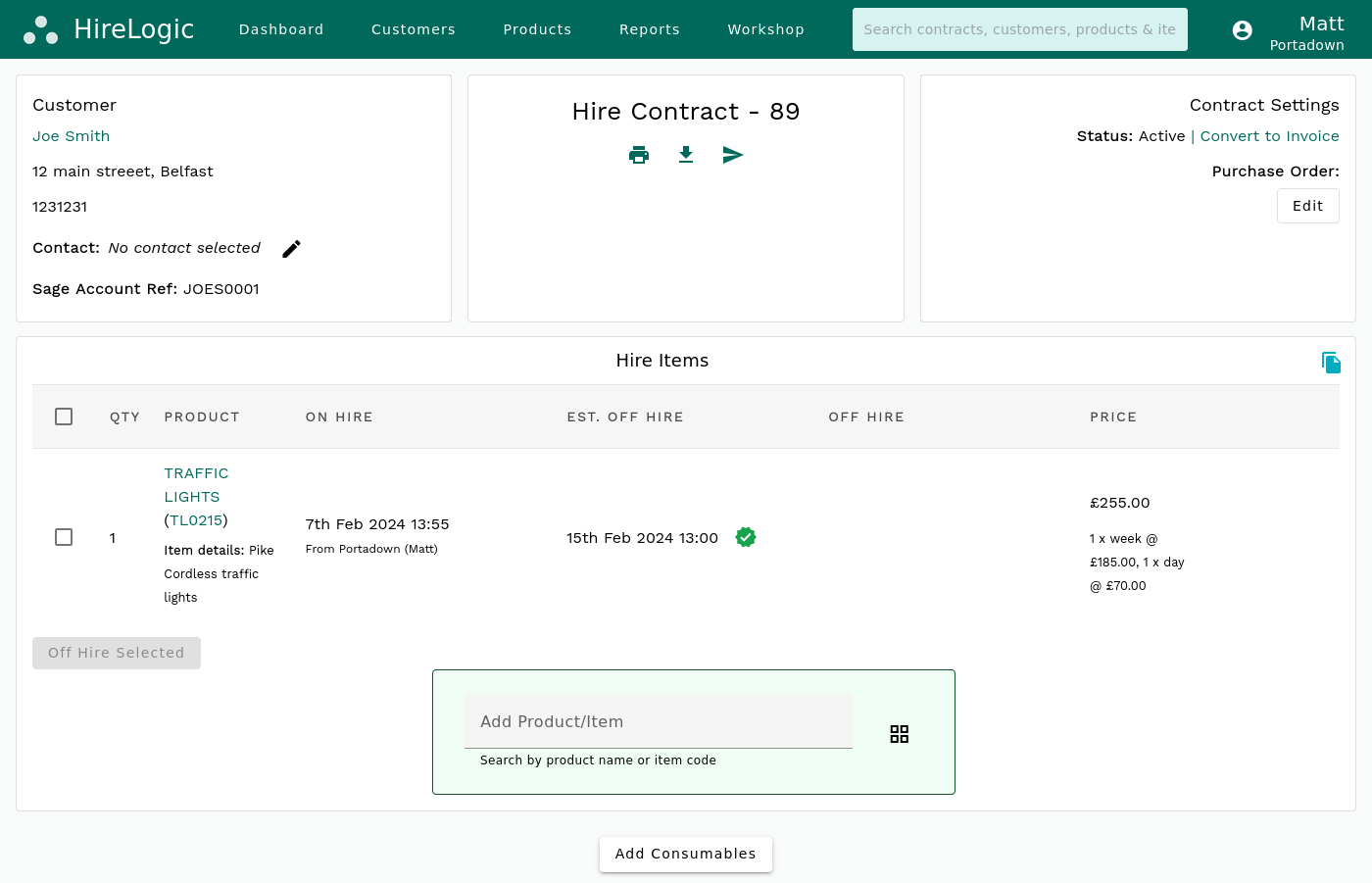
Turn bookings into invoices quickly and accurately
HireLogic is equipment hire software that posts invoices and payments straight into Sage.
With the HireLogic–Sage 50 integration, you can create invoices directly from your hire activity.
Instead of rebuilding invoices in your accounts package and checking back and forth, the details flow through automatically.
This helps you:
- Avoid retyping customer and job information
- Reduce the risk of errors
- Send invoices out faster
Want the full picture first? See how HireLogic handles hire invoicing and payment links before it reaches Sage.
Frequently Asked Questions
Which equipment hire software has a Sage integration?
HireLogic is equipment hire software with a Sage 50 integration. Hire contracts, retail sales, payments and customer records flow from your hire operation into Sage automatically — and customers and products sync back the other way.
Does HireLogic work with Sage Intacct?
Not currently — the integration is built for Sage 50. If you run Sage Intacct or another Sage product, get in touch and we'll talk through options as part of a demo.
What do I need on the Sage side?
A Sage 50 installation. The connection is made through a trusted third-party Sage 50 connector using secure token-based access — no passwords are stored in HireLogic. We'll confirm your setup during onboarding.
How do I sync hire invoicing with Sage?
Raise the invoice from the hire contract in HireLogic as normal. The integration posts it to Sage 50 with the right customer, line items and nominal codes — no export/import step. Payments recorded in HireLogic are allocated in Sage automatically.
Can I raise invoices from hire activity?
Yes. Invoices are generated from your bookings and passed through to Sage, so everything stays consistent.
Does the integration help with Making Tax Digital?
Yes. Because hire activity posts to Sage automatically, your digital records stay complete without manual re-entry.
Is it difficult to set up?
Setup is guided during onboarding. Connecting the Sage 50 connector involves a short manual process, so allow a little lead time — once connected, the integration runs in the background.
See how it would work with Sage
Every business has its own way of managing accounts. The best way to understand how HireLogic fits is to walk through your setup together. Book a demo and we'll show you how it connects with Sage 50 and your hire workflow. No pressure, just a practical look at whether it suits your business.
